Feature Announcement
VS Code Extension
Share code snippets directly from your editor. Select code, press a shortcut, and get a shareable URL.
The pastecn VS Code extension brings code sharing directly into your editor workflow. No need to copy code to a browser, select a language, and configure options separately.
Select code, trigger the command, and the extension creates a snippet and copies the URL to your clipboard. Your code is immediately shareable as a shadcn-compatible registry URL.
Installation
From VS Code Marketplace
Open VS Code, go to Extensions (Cmd+Shift+X / Ctrl+Shift+X), search for "pastecn", and click Install.
From Open VSX (for VSCodium)
The extension is also published to Open VSX for VSCodium and other VS Code alternatives. Search for "pastecn" in your editor's extension marketplace.
From VSIX file
Download the .vsix file from the GitHub releases page, then install via the command palette: "Extensions: Install from VSIX..."
Features
Three commands to share code in different ways, all accessible via command palette or keyboard shortcuts.
Select code in the editor and share just the selection. Perfect for sharing specific functions, components, or code blocks without the surrounding context.
Share the entire active file. Useful when you want to share complete components, utilities, or configuration files.
Enter a snippet URL or ID to open it in your browser. Quick access to view shared snippets without leaving VS Code.
Keyboard shortcuts
The extension includes a default keyboard shortcut for the most common action. You can customize shortcuts in VS Code's keyboard settings.
Share Selection
Share the currently selected code
On Windows/Linux: Ctrl+Alt+S
Context menu
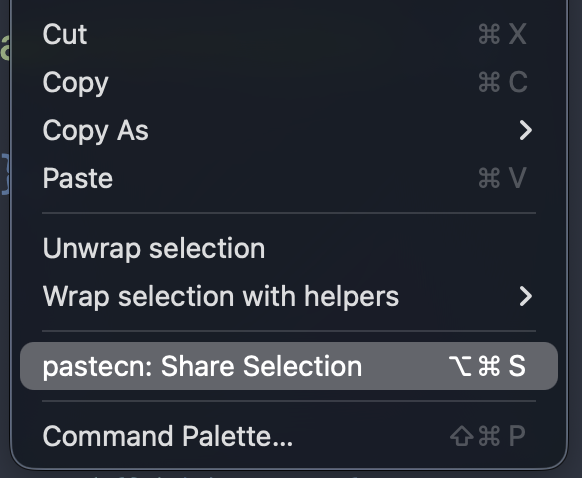
Right-click on selected code to access the "pastecn: Share Selection" option directly from the editor context menu. This appears only when text is selected.
How it works
Select code
Highlight the code you want to share. This can be a single line, a function, or any arbitrary selection.
Choose expiration
A quick pick menu appears with expiration options: 1 hour, 24 hours, 7 days, 30 days, or never expire.
URL copied
The snippet is created and the URL is automatically copied to your clipboard. A notification appears with an option to open the snippet in your browser.
Configuration
The extension can be configured through VS Code's settings. Access settings via Cmd+, (Ctrl+, on Windows/Linux) and search for "pastecn".
Base URL for the pastecn instance. Default: https://pastecn.com
Use this setting if you're running a self-hosted pastecn instance.
Default expiration time for new snippets. Options: 1h, 24h, 7d, 30d, never
The quick pick will still appear, but this sets the pre-selected option.
Self-hosted instances
If you're running your own pastecn instance, configure the extension to use your custom URL.
{
  "pastecn.baseUrl": "https://your-instance.com"
}
All snippets created through the extension will be stored on your instance instead of pastecn.com.
Use cases
Quick code reviews. Share a function or component for feedback without pushing to a branch.
Documentation examples. Share code snippets in documentation that can be installed via shadcn CLI.
Team collaboration. Share utility functions, hooks, or components with team members instantly.
Stack Overflow answers. Share runnable code examples that others can install directly into their projects.